
1 min read
A lot of businesses that approach us, especially those looking for clocking-in systems, ask if we have a timesheet app.
(more…)1 min read
A lot of businesses that approach us, especially those looking for clocking-in systems, ask if we have a timesheet app.
(more…)5 min read
Tech spending in HR is grinding to a halt at the worst possible time.
Teams are being called upon to increase productivity and cut costs, yet HR is frequently excluded from company-wide digital transformation. It’s well-known that automation and digitalisation can boost efficiency and simplify workflows. But instead of letting tech lift the burden, HR professionals are distracted by busy work and outdated systems.
The exclusion is tinged with irony. HR professionals are essential for making sure employees are engaged and on board with transformational change. But when it comes to digital transformation within the department, HR is all too often overlooked.
The pandemic amplified the need for digital HR. Remote work, virtual onboarding, and employee wellbeing – all people-centric functions – demanded an overnight migration to the virtual world. As digitalisation persists across companies and industries, it’s time for HR departments to catch up.
The benefits of digital HR stack up. By automating some of the day-to-day admin, and introducing autonomous workflows for recruitment, onboarding, and employee benefits, you can create more capacity in your team without hiring an extra pair of hands.

Today, many HR professionals are trapped in an endless ream of admin and repetitive work. Instead of focusing on strategic goals like developing the company culture or improving employee experience, teams are snowed under with compliance and payroll tasks.
Embracing digital HR gives teams more time to focus on the ‘human’ aspects of HR. Manually updating employee records and managing annual leaves are important tasks, but they don’t have to be performed by a human.
Figuring out how to engage employees with a new learning and development programme, or strategising in response to an employee survey, requires human HR minds on the job.
As teams become more distributed, having a human resources function focused on the people can help to reinforce relationships and culture that transcends the physical office.
Historically, interactions with HR teams have had negative connotations. Often, employees only engage with HR when the rules are broken, compliance is challenged, or disciplinary action is necessary. As a result, people outside of HR don’t always see the strategic and empathetic work professionals are doing inside the department.
But smoother, digitised workflows could help to improve relations between HR and wider teams. By automating some communications and replacing manual processes with simple digital systems, you can give employees a seamless way to engage with HR. Booking annual leave or updating employee records requires a few clicks – instead of a few emails.
With better systems to manage the admin, you can work with employees directly on the things that matter most to them – such as onboarding, learning and development, and performance.
In another universe, human resources could be retitled as human relations. For job applicants, HR is often the first department candidates are properly introduced to – the first glimpse of what working at your company looks like.
Today, many businesses struggle to keep candidates engaged. One survey from 2022 found that 78% of job seekers would drop out of a recruitment process that’s too lengthy or complicated.
Technology can simplify and expedite hiring procedures. You can automate email updates and interview scheduling so candidates are kept in the loop. As well as centralising all candidate information, so you can easily filter applicants and keep the process moving.
Digital HR teams can create a positive ripple effect for people outside of the department. Just make sure you avoid siloing your efforts.
Microsoft CEO Satya Nadella sees purpose and culture as the ultimate drivers of business success.
Before the pandemic, the Microsoft Digital Employee Experience team was investing heavily in search and collaboration tools. The HR team was working on a learning and development tool. Company-wide town halls, an internal SharePoint redesign, and an employee mobile app were also in the works.
Employee experience was the North Star. But instead of approaching it collectively, teams moved forward in isolation. This led to overlapping work and duplicated efforts.

The teams recognised this before it was too late. Acknowledging the complexity, they decided to seek out simplicity instead.
Simplicity came in the form of one centralised platform, combining the efforts of digital, HR, and employee experience teams: Microsoft Viva.
Silos create complications. But collaboration fuels simplicity. Before embarking on your digital transformation journey, coordinate efforts with the wider company. Digital transformation can’t happen without cultural change – and as stewards of culture and employee experience – HR teams need to unite all corners.
Step away from the software and investigate the digital needs of your department.
Ask yourself:
What tasks are you spending the most time on?
Which processes do your team struggle to follow?
Which processes do employees struggle to follow?

You might already have some ideas driving your digital transformation ambition. But make sure to validate these with an employee survey.
Conducting a survey will also help you understand which aspects of HR are and aren’t working for employees. For instance, if the majority of employees struggle to coordinate their annual leave, this should be one of your top priorities.
Once you’ve identified the challenges you want to solve, start with one HR tool – and focus on integrating it properly. Use the software to its full potential before adding more tools to your stack. If you want to get it right the first time, introduce software trial periods and gather employee feedback before committing.
As Microsoft’s case study demonstrates, a robust digital transformation approach encompasses multiple departments and voices. Come together with leaders from across the company to see which digital tools and workflows they’re having success with. See if you’re able to implement them before adopting new ones. This has the double benefit of being more cost-effective and supported by internal experts who already know how to use the software.
The final step is the hardest one. HR professionals must challenge siloed working and demand a seat at the table for wider digital transformation plans. By understanding company goals, you can tie digital transformation efforts to organisational ambitions – and play an integral role in achieving them.
Taking on technology is a top priority for CEOs – it’s time businesses start supplying their HR teams with the digital tools for the job.
HR plays a critical role in ensuring digital transformation projects are successful. As a company-wide touchpoint, HR professionals encourage employee buy-in and engagement during business transformation.
But without the right digital tools, HR teams will struggle to support company digital transformation and department-level change.
A shift in thinking is overdue. It’s time for HR professionals to embrace their role as change agents in the digital era.
2 min read
As businesses everywhere make difficult decisions and consider cutbacks and redundancies to stay afloat, HR is at the frontline for creating an empathetic and compassionate offboarding process – compliantly and remotely.
Offboarding is the process that a company implements when an employee’s contract is terminated. It includes signing termination paperwork, conducting an exit interview, retrieving any company benefits such as laptops or phones, and revoking access to physical and online workspaces.
With redundancies on the rise, it’s more important than ever to leave working relationships on good terms - your company’s reputation depends on it. In regular times, the importance of offboarding is a given, but in uncertain times, offboarding employees needs to be done fairly and with empathy.
People leave; it’s part of every company’s journey. Even with the flexibility and benefits of remote work, there comes a time when employees move on. Despite this, only 29% of companies have laid out a formal offboarding process.
Your employees deserve a decent farewell as much as they deserved that warm welcome when they first arrived. Make employee offboarding a priority on your task list and turn an awkward goodbye into a memorable experience that benefits everyone.
Here are some essential steps to make offboarding remotely a success:
Taking time to develop a strong offboarding process can be beneficial for your company on so many levels. It can help management identify areas that need improvement in the future.
By completing successful offboarding procedures, you can leave the door open for employees who might want to return with new skills or, at the very least, be an asset to your organisation in the future.
Having an offboarding process in place is also a great indicator to current and future employees that your organisation’s company culture values their progression from start to finish and is interested in constant improvement.
4 min read
Some of the most topical questions we’re asked at the moment are understandably regarding HR and GDPR (General Data Protection Regulations).
First of all, it’s important to clarify that no HR or recruitment software solution will ensure you’re instantly compliant when handling employee data or managing consent.
Outside of the integrity of the supplier and their security standards and data storage locations, it's your policies, not your system, that will ensure you meet compliance requirements.
That being said, dependent on their infrastructure, many HR systems will assist you greatly in meeting requirements in line with the right policies being defined.
For HR professionals concerned about the impact that GDPR has on people management and talent acquisition, there are plenty of online checklists, official guidelines for both the UK and Ireland, and extensive advice and legal notes are available.
You should check in your region about extra legislative requirements on data retention. This might include data retention laws on what information you’re obliged to keep for legal reasons that might otherwise conflict with or supersede general GDPR commitments.
For example, with HR software systems that have a strong element of employee self-service in how they manage their personal contact details and similar data, is it reasonable to keep next-of-kin records following a team member’s exit from the organisation? Perhaps it could be if there is a life insurance policy or pension attached to a deceased team member that can benefit their partner or spouse.
Another example is construction workers. In some jurisdictions, former workers’ records must be held indefinitely, in case they were ever in contact with asbestos. In cases such as these, you need to retain the relevant data.
Again. This is you meeting your relevant policies and obligations to ensure wide compliance, not the system. The system just enables this customisation for your specific case.
HRLocker allows you to trim down information retained for tangible or legal reasons – and demonstrate that in one central location.
Ultimately, it's your policies meeting regulations that will make you compliant.
Let’s take recruitment and the retention of CVs you receive as an example. How long should you keep applicant details following a job application?
What is a realistic and justifiable period to retain this information in line with your recruitment pipeline’s lifecycle? Only you can define this—not the system.
Do you inform applicants about your policies and the reasons behind them? For instance, you might state in an automated response to applicants that you like to keep CVs for future or alternative opportunities you may have, and ask that they tick a box to confirm their consent.
HIRE - HRLocker's integrated, end-to-end recruitment and onboarding platform - is secure and will satisfy auditors ‘ security standards. However, you will only be GDPR compliant if you have a policy that clearly outlines the appropriate reasons and purposes for storing data.
The HRLocker system is fit for purpose, but you must define the policy template for retention periods – and explain why they are set to the agreed-upon period. With a cloud solution like HIRE of HRLocker, it’s easy to manage and demonstrate diligent handling and purging of data should you get a request to delete data.
If you have disparate records in multiple systems or can't refer to a supplier’s Information Security Standards, then you are leaving yourself – and your data subject’s details – in a vulnerable position.
During a customer’s lifetime as an HRLocker client, HRLocker will act responsibly as both a data controller and processor.
HRLocker will never delete the client’s data – until an account is terminated – and then all data is deleted permanently from the system. We only retain information such as customer account financials to meet our GDPR and data compliance responsibilities.
Therefore, it’s your responsibility to manage the data held within the system. And to remove it and manage it responsibly once you have extracted it.
HRLocker will not automatically make your data GDPR-compliant. Only you can do that by setting the appropriate policies. HRLocker does, however, give you all the tools to manage data responsibly and demonstrate your levels of accountability and our integrity as a supplier. All data is stored in the EU.
4 min read
Being privy to the ins and outs of your business is a surefire way to achieve success. With cloud-based platforms like time and attendance systems, you can stay in the know while giving employees real-time information. What’s more, this advanced technology comes equipped with reporting tools, allowing you to gain unmatched insight into your operations. With these reporting features, you can update data, create custom perspectives, and share information with ease.
Ideally, you want your time and attendance system to do more than track an employee’s hours and absences. Fortunately, at HRLocker, our software is all-inclusive, making it possible for you to gain a deeper understanding of your company’s attendance trends, work practices, and performance rates. Our time and attendance systems also offer graphical reporting capabilities. When you avail yourself of our cutting-edge resources, here are some of the benefits you can reap...
When employers and employees share the same information, it bodes well for a harmonious relationship. Moreover, it’s easier to identify problem areas together. In other words, since both parties are equally informed, there’s less confusion.
Best of all, time and attendance systems enable supervisors and subordinates to relay statistics and progress reports. In addition to levelling the playing field, this also fosters clear and honest communication. Since communication is at the heart of any healthy relationship, time and attendance systems play a prominent role in nurturing a mutually beneficial partnership.
Though many hands make light work, this notion only rings true if everyone is on the same page. Otherwise, team members are liable to carry out the same task twice, wasting both time and effort. To decrease duplicate efforts, time and attendance systems generate reports that show what needs to be done. Using this information, employees can move on to the next project. In essence, this intelligent software encourages teams to optimise their time, creating a more productive workforce.
With powerful reporting, managers can steer their team in the appropriate direction. Additionally, by gleaning information from in-depth reports, executives don’t have to rely solely on their intuition. As a result, it’s easier to make more informed decisions and, in turn, develop sensible solutions. With that said, when companies opt not to employ time and attendance systems, human error remains a very prominent and real threat.
Similarly, powerful reporting breathes clarity into dissecting problems. For instance, if an employee needs to resolve an issue, they can use reports to help analyse potential outcomes. By exploring various alternatives beforehand, solving the problem is a cinch. Simply put, reporting features are designed to promote critical thinking and eliminate doubt.
When operating a business, it’s critical to spend money wisely. With time and attendance systems, organisations can decrease costs and increase profitability. Powerful reporting, specifically, allows managers to restructure operations seamlessly, resulting in enhanced efficiency. When a company operates like a well-oiled machine, it brings in more money.
Powerful reporting tools also require less manual labour. When fewer hands are needed to complete a specific task, businesses avoid having to pay employees overtime. With more funds readily available, companies can focus on setting their team up for a brighter, more prosperous tomorrow.
Above all else, powerful reporting tackles customer issues head-on. Thanks to the numerous details that these reports provide, employers can address all problems and concerns promptly and professionally. While it’s crucial to fulfil employee needs, it’s equally important to put a premium on customer satisfaction. Not only does this ensure that you remain in good standing with both employees and customers, but it also keeps your business one step above the competition.
Overall, any company looking to improve its inner workings should invest in time and attendance systems. Fortunately, this advanced technology is growing by leaps and bounds, giving businesses more opportunities to improve their bottom line.
At HRLocker, we believe in the power of time and attendance systems. Though these systems are brilliant, it can be hard to decide which one is right for you. If you need assistance during this process, place your trust in our years of experience. To learn more about our products, give us a call today.
4 min read
An employee handbook is a guide given by employers to all staff members when hired into the company. It details company policy, work culture and anything else an employee needs to know to successfully onboard into their new environment.
The handbook is given to employees on or before their first day of work, so they can quickly adapt to the company. The employee handbook serves as a reference tool for employees to help them with everyday issues and can also prove beneficial in helping employees settle into their new roles. It’s a great way to introduce your new people to your company culture.
The handbook should also include the company's disciplinary and grievance procedures, policies on bullying and harassment, and policies in respect of sickness, annual leave and probationary periods.
An employee handbook should be customised to each specific company, but generally, they contain the following:
Your employee handbook is a valuable resource for your company. You should spend some time drafting and refining it before release. We have laid out some steps to help you on your way:
Any good employee handbook should be easy to read, with plain language that avoids excessive corporate jargon. Setting the tone for the reader will create a positive impact and will encourage the employee to engage fully with the content. A less formal, more conversational tone will make for a more interesting read.
It’s a proven fact that companies that have a good work culture have the happiest, most productive employees. Happy employees are great brand advocates. Your messaging or brand should be broadcast to everyone in the company from day one so they can understand your values.
Educate your employees about where your identity came from and what drives your company culture. This is important to get buy-in from your workforce, so be sure to make this an essential part of the handbook.
You should begin by giving employees an overview of the benefits of working at your company, then lay out the information required to help them navigate the first couple of weeks. Provide helpful information, like if you have a dress code or include information about the company break room and expectations about keeping it clean.
Employees want to know what it’s like to work for your company, and usually won’t wade through the drudgery if there’s no payout.
Good design goes a long way. Use your brand colours and a bold design that will make new hires want to open the handbook. If you have a budget, consider hiring a graphic designer and photographer to help create a guide that is relevant, real, and showcases your company. Keep it as close to your company identity as possible, and if you rebrand your corporate look, rebrand your handbook along with it. Give your employee handbook a big dose of character.
Make your handbook available in digital format and allow for a print version.
Digital handbooks are also great for new employees to receive before they start their first day in the office or remotely. Give your employees a reason to be excited about starting at your company.
When Valve’s employee handbook got leaked in 2012 it immediately went viral – and for good reason! Few handbooks are as empathetic, informative, and full of personality. It strikes a perfect balance between being humorous and helpful, and will likely remain the holy grail of employee handbooks for years to come.
Click here to download a full PDF of the Valve Handbook
An employee handbook keeps all of your company policies and procedures in one central place and helps you stay consistent in enforcing those policies and procedures. This can be essential if legal questions arise or if an employee breaks one of your company policies.
The Society for Human Resource Management (SHRM) advises that employers should not only distribute a copy of the employee handbook to every employee, but also that every employee should be required to sign a document declaring that they received, read, and will follow the rules outlined in the employee handbook. This can protect your organisation if you are required to discipline an employee based on policies and procedures in the employee handbook.
The CIPD also states that an employee handbook sets out terms and conditions that need to be provided to employees in writing under the Terms of Employment (Information) Acts 1994-2014. It compares employment contracts and employee handbooks and warns that terms set out in employee handbooks are often treated as part of the employee contract, especially when they concern grievance procedures.
5 min read
Employee retention is a crucial concern for companies as they compete in the marketplace for high-performing people. So how do you keep your employees engaged within your workforce? Adult development and creating a great work culture seem to be the answer. It encourages better productivity, higher employee morale and improved quality of work, not to mention a reduction in turnover. By focusing on employee retention, organisations avoid losing talented and motivated employees who are dedicated to contributing to the organisation’s overall success.
LinkedIn data shows a worldwide turnover rate of 10.9 %. The tech sector experienced the most volatility, with a 13.2% turnover rate. Certain areas within the tech sector showed even higher turnover rates, which could indicate an increased demand for these skills.
Employees leave for a variety of reasons, such as ‘I don’t like my Manager', I am not being developed', 'Location does not suit me', 'My work environment is too negative’. Contrary to popular belief, compensation ranks fifth on the top benefits for retaining talent. It takes objectivity from management and HR resources to understand that poor people management is the major culprit in most turnover cases.
So how do you keep employees happy within your company? Here are a few easy steps to get going.
Retention begins from the very start, from the application process to screening applicants to choosing who to interview. It involves identifying the most important aspects from the onset. Progressive companies place a huge emphasis on culture and principles, values and behaviours that exist within the company and assess whether or not potential employees can work best within their set-up and if an employee will be motivated or thrive within their company culture. A CV will tell you what the person has done in the past, but it won't tell you how they will work out in the future—your behavioural interviewing skills should help here.
How can you choose candidates who are more likely to stay? There are some key indicators right on their CV. Begin by looking at why people left their previous jobs.
Job hoppers may not be the right choice. While they might just be looking for the right place to settle, for a candidate who’s had five jobs in five years, it is important to find out why they left each role in the past. From there, you can decide whether or not they will be a fit for your organisation.
Promoting from within not only provides a clear path to greater compensation and responsibility, but also helps employees feel that they’re valued and a crucial part of the company’s success.
Of course, promotions go hand-in-hand with employee development and education, and this should be another tool in your retention arsenal. Whether through corporate training to help foster the acquisition of new ways of working, skills, new technologies or new processes or through tuition reimbursement for outside courses, furthering your employees’ education can help them feel valued and invested in the company.
According to research from the Consumer Technology Association (CTA), high-skill training (80%) and professional development programs to hone soft skills (74%) are perceived among the top benefits for retaining employees’ services over the next five years.
With the rise of deliberate development organisations (DDOs), the companies that are doing well are those that are placing employees at the centre of the company’s growth strategy.
According to a study conducted by acclaimed American developmental psychologists (Robert Keegan, Lisa Laskow Lahey, Deborah Heising, Mathew L. Miller and Andrew Flemming), they found that companies such as Next Jump reduced employee turnover from 40% to less than 10% in under two years by putting the development of their people at the centre of their strategy.
Investing in employees’ development can help retain talent and intellectual property at a time when there’s stiff competition for both. The need for new skill sets and evolving roles is in demand at a rapidly growing rate. Therefore, putting someone on a career path that lacks room for growth is not only a career-limiting move for the employee but a business-limiting move for the company.
Benefits and perks play a large role in keeping employees happy, engaged and healthy. But benefits can go far beyond healthcare coverage and paid sick leave. You should also consider offering stock options or other financial incentives to employees who exceed performance goals or stay with you for a predetermined period.
Flexible work schedules, the opportunity to work remotely and generous paid leave policies also go a long way toward helping employees feel they are valued well beyond what they contribute at the workplace.
Flexible working arrangements and remote working ranked fourth among the top benefits for retaining talent, behind health insurance, bonuses, and paid time off.
Open, transparent communication between employees and the company can help foster a sense of community and a shared purpose. Regular meetings in which employees can offer ideas and ask questions, as well as 'open-door policies' that encourage people to speak frankly with their managers, help employees feel they are valued and that their input will be heard. In order for this to happen, the company needs to create an environment where it is safe for everyone to share their vulnerabilities and create an environment where it is ok to fail.
Another approach is to use an employee review tool. HRLocker has created a tool that has demonstrated real benefits. We developed RTR (real-time reviews) as a way to create a dialogue between employees and managers. It’s a performance management module that helps track and monitor how happy and fulfilled your employees are in the company.
Since employing it within our own company, we have found that our employee retention has improved greatly. Everyone knows that within the company structure, issues will arise. RTR enables everyone in the company, including managers and employees alike, to set weekly or monthly reviews, allowing HR and management to identify issues early on and rectify them. It’s then up to company leadership to act on that feedback or explain why that employee or manager might not be happy. Sometimes, just the fact that employees are being heard and listened to is important and can improve retention, even if there’s no way the company can address their challenges at that moment.
These are just a few steps to set you on the right path to retaining people in high-performing areas such as tech, professional services, not-for-profit, and construction. Implementing the right structures and creating an environment that encourages people to stay will help you to keep your employees happy and engaged.
7 min read
With an applicant tracking system, you can breathe simplicity into building your dream team. From recruiting to talent acquisition, possessing an ATS will assist you with all your hiring efforts. Not only do applicant tracking systems help streamline workflows, but they also provide optimal sourcing.
In this article, we’ll look at some of the best applicant tracking systems and help you make an informed decision based on your unique needs and requirements.
Table of Contents:
| Simplify and Save Time in Your Recruitment and Onboarding Processes with HRLocker. |
Selling yourself to prospective employees is crucial. Most importantly, you want your company to appeal to candidates, meaning your advertising efforts should be flawless. With an applicant tracking system, you can build a career site that allows you to highlight your company’s culture and assets. ATS software can also integrate with job boards and social media platforms, making it easier for you to reach a wider audience.
Finding qualified candidates is no easy task. With an ATS, your recruiting team gains access to talent pipelines. In addition to simplifying your sourcing efforts, this also ensures that you have potential employees in your back pocket. In other words, you can keep close tabs on people you might want to hire in the future.
Welcoming employees to your team is an involved process. When helping employees understand their new position and job requirements, transparency and efficiency are crucial. With an applicant tracking system, you can effortlessly get new staff members acquainted with company policies and procedures.
With sufficient insight, employers can gain a deeper understanding of their hiring process. Smart dashboards offer ample information, ranging from recruiter productivity to hiring costs. Using this information, employers can streamline their hiring methods.
Cloud-based systems deliver several benefits. Unfortunately, most businesses don’t take advantage of this advanced architecture. With an ATS, you experience the many perks that cloud-based platforms have to offer. From quality control and security to flexibility and loss prevention, cloud-based solutions promise peace of mind.
By customising your workflow, you build a well-oiled company. With an ATS, your talent acquisition team can develop a recruiting process that complements your brand’s needs. More specifically, unique workflows make screening candidates and processing applications a breeze. With these simplified affairs, your team can establish more efficient hiring techniques.
Here are our five recommendations for the best Applicant Tracking Systems. You’ll find an overview of each with key features and pricing.
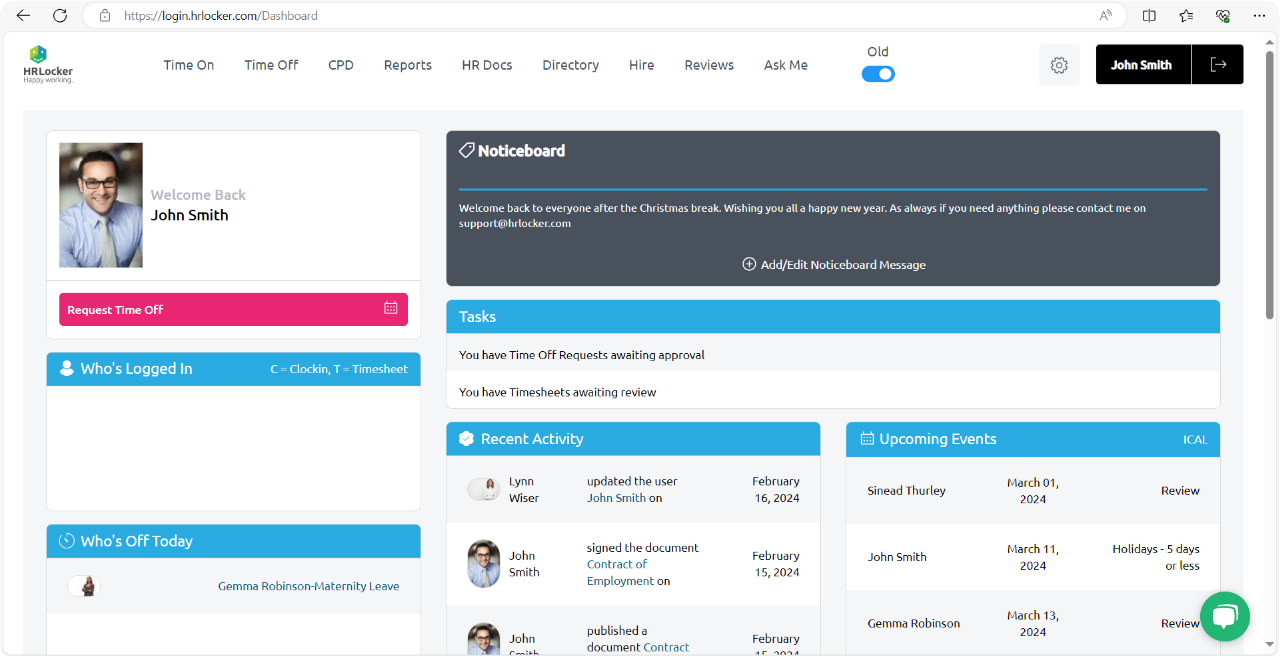
Centralise your HR processes with HRLocker’s self-service portal
HRLocker is a cloud-based all-in-one HR solution awarded the ‘All-Star HR Software Company of the Year’ three times in a row and included in the All Ireland Business Foundation (AIBF) Register Of Irish Business Excellence, a national body that accredits outstanding companies.
HRLocker’s Applicant Tracking System, HIRE, enables you to create custom jobs in your own style and company branding guidelines.
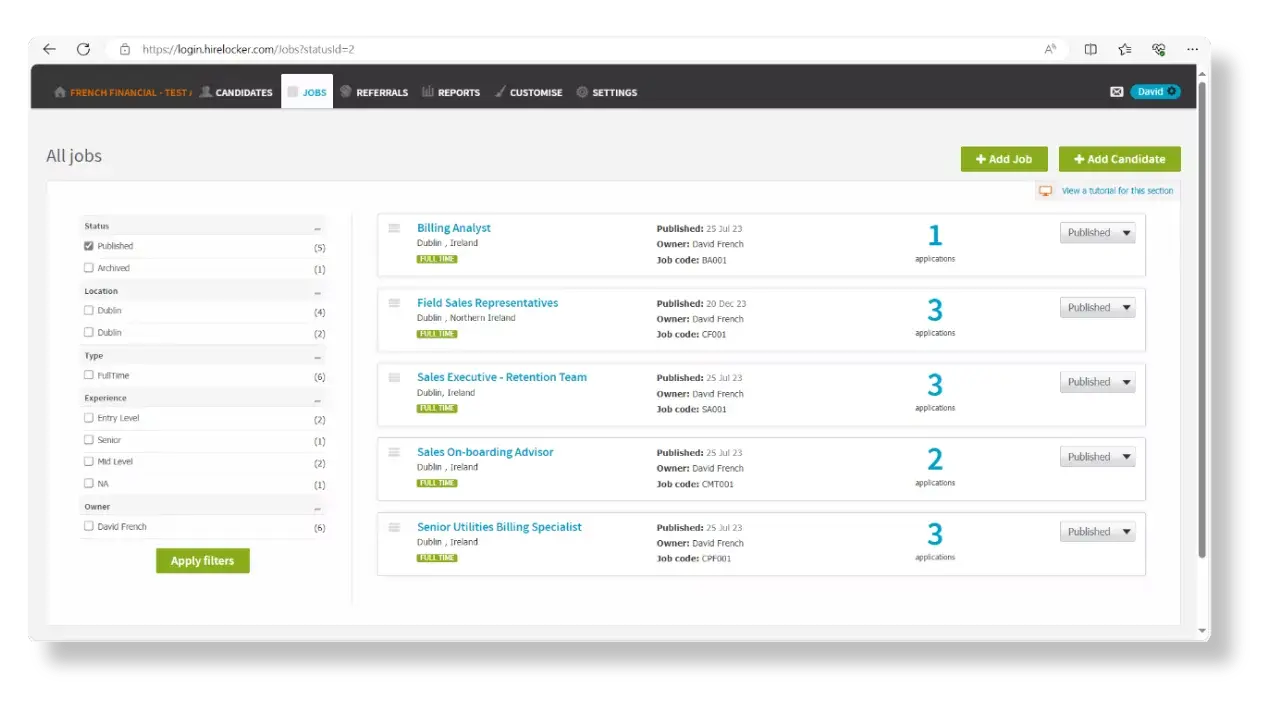
Manage your entire recruitment process with HRLocker’s Applicant Tracking System (ATS)
HIRE is a fully customisable hiring and onboarding software that enables you to screen, interview, offer, onboard and even reject candidates. You can integrate your website with HIRE and bring the best candidates through your hiring process.
| HRLocker Plan | Who’s it suited for? | Pricing |
| HR Essentials | Teams with 15+ employees – for managing day-to-day HR operations & tasks | €4/£3.50/$5 |
| HR Professional | Teams with 15+ employees – for managing your hybrid or remote team | €6/£5.50/$7 |
| HR Enterprise | Teams of 250+ employees looking for flexible HR solutions | Tailored quote |
The Recruitment & ATS feature is sold as an Add-On for €500 per job posting.
| Simplify and Save Time in Your Recruitment and Onboarding Processes with HRLocker. |
Greenhouse Recruiting enhances candidate interactions at all stages, streamlining administrative tasks and ensuring active engagement from the entire hiring team. Recognised as a leader in diversity, equity, and inclusion (DE&I) initiatives, Greenhouse provides cutting-edge tools that mitigate biases and foster a more equitable hiring process.
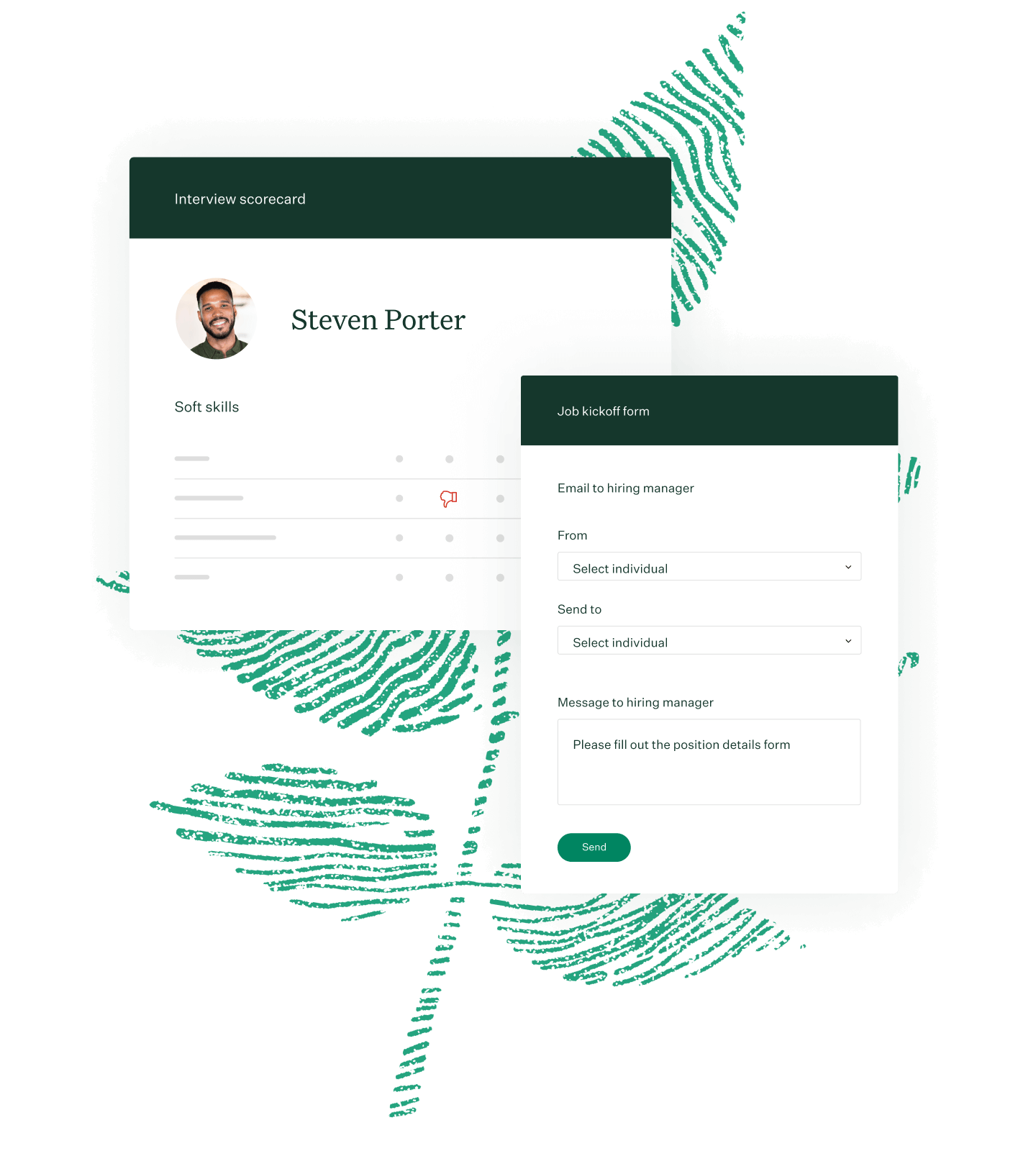
Interview scoreboard – Greenhouse Applicant Tracking Service (ATS). Source
Greenhouse doesn’t publish pricing information on its website. However, they offer a free demo and consultation.
Sage HR is an intuitive Human Resource software solution. Its customisable dashboard provides employees with a comprehensive overview of their objectives, assignments, leave status, and feedback, enhancing operational efficiency.
The platform facilitates employee scheduling and encompasses essential features, including performance evaluation, expense tracking, and onboarding/offboarding processes.
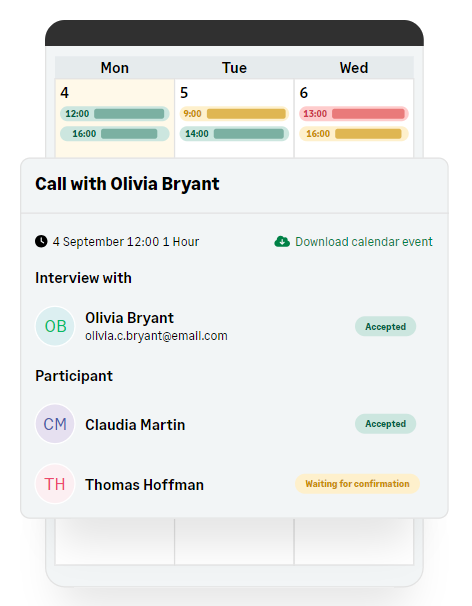
Sage HR Recruitment Feature Dashboard. Source
Sage HR offers plans from £4.60/month per employee. Its recruitment feature is sold as an add-on for £170/month.
Eploy offers a comprehensive cloud-based applicant tracking system and talent CRM solution. By merging Applicant Tracking, Recruitment CRM, Talent Pool Engagement, Onboarding, and Analytics functionalities, Eploy delivers a unified, web-based platform. Seamlessly integrated with your careers site, Eploy ensures a superior experience for recruiters, candidates, and hiring managers alike.
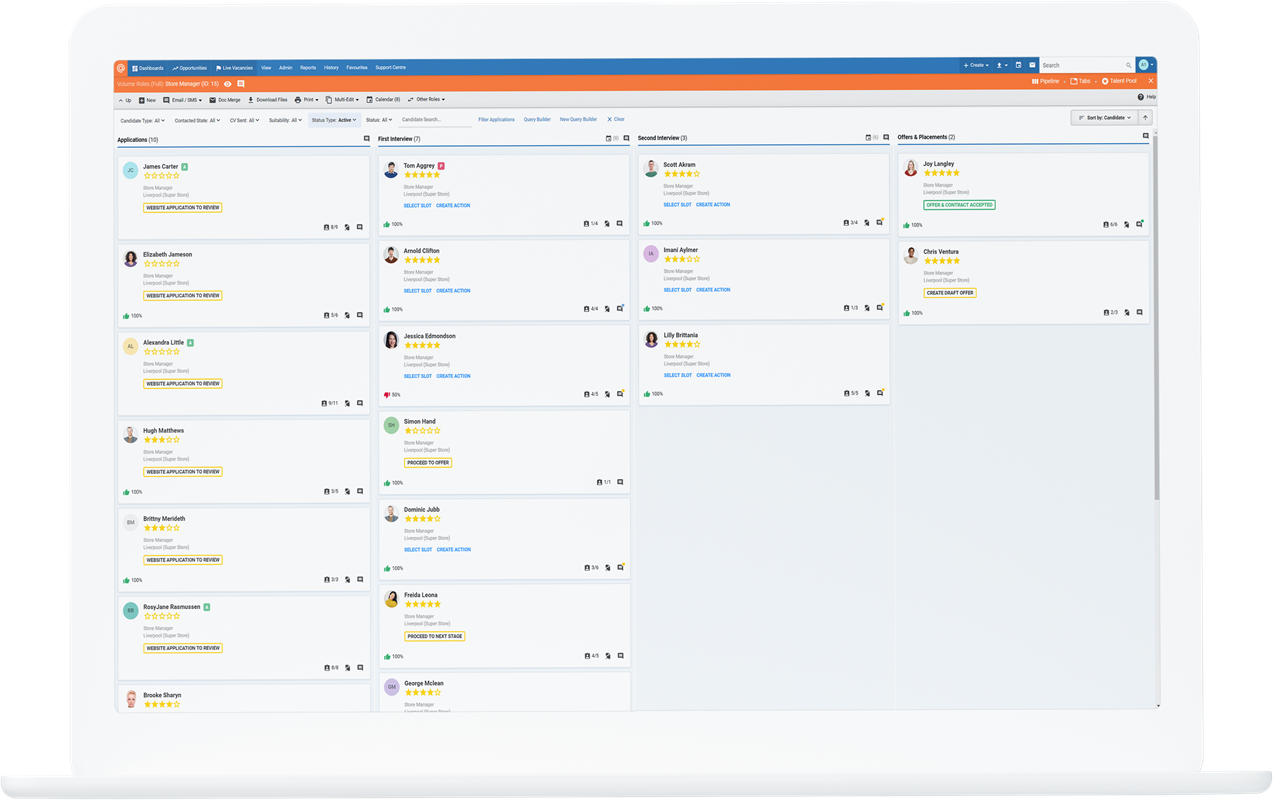
Eploy Applicant Tracking System Dashboard. Source
Eploy doesn't publish pricing details on its website. You have to contact them directly for a quote.
Manatal represents cutting-edge recruitment software, tailored for both recruiting agencies and in-house HR departments spanning various sectors. Utilising cloud-based infrastructure and incorporating state-of-the-art technologies, it aims to enhance every stage of the recruitment journey, from candidate sourcing to seamless onboarding and beyond.
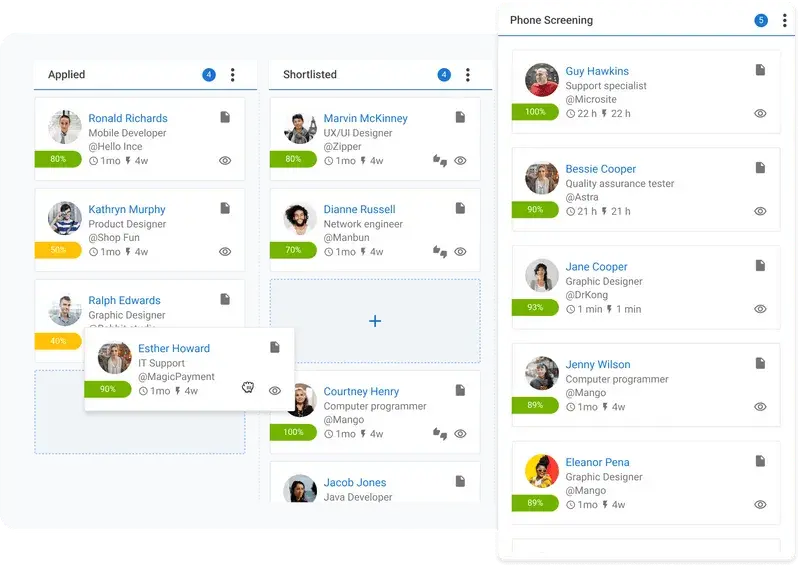
Manatal Applicant Tracking System (ATS) Dashboard. Source
Manatal offers four plans, priced per user/month:
To ensure that you choose an ATS that’s right for you, we make our expertise readily available to our clients. What's more, we offer the following advice to help you make informed decisions along the way.
While an ATS is ideal for applicant tracking, it can also help schedule interviews and locate employee referrals. With that said, look for an ATS that does more than track applicants. With more bells and whistles, your HR team can optimise their time.
Your hiring managers, employees, and recruiters are heavily involved in the hiring process. With that in mind, their input is essential. By having them identify weak spots, you’ll know what to look for when buying an applicant tracking system.
Your company’s roadmap plays a crucial role in executing tasks effectively. With that in mind, you should have a clear understanding of what your strategic plans look like. With this insight, you can choose an ATS that’s advantageous to your company.
Applicant tracking systems are equipped with several features. To whittle down the many options available to you, choose a handful of features that are must-haves. From there, we can point you in the appropriate direction.
Though an ATS is an essential workflow tool, it’s also a money-making system. Simply put, applicant tracking systems drive ROI, making your business more profitable. Through sourcing and recruitment marketing, an applicant tracking system yields favourable results.
At HRLocker, we provide several solutions that help you hire key talent for your organisation. With so many applicant tracking systems on the market, we understand how challenging it can be to make a decision. Reach out today to discover how we can connect you with an ATS that works for you.
4 min read
Much like its name suggests, a time and attendance system is a savvy resource that allows you to track an employee’s time and attendance. Ideally, your time and attendance system should be user-friendly and easy to implement. With this technology, you can ensure that employees are compensated appropriately, guaranteeing fair, streamlined affairs. While these systems are great for managing time and attendance, they also provide insight into an employee’s performance. For optimal results, here are some factors to consider when choosing a time and attendance system.
If you drop the ball on tracking employee hours, you’ll fail to compensate your workers. Not only will this make your business look disorganised, but it’ll also wreak havoc on morale. With that said, your time and attendance system should take the hassle out of these proceedings by ensuring a timely payroll process. Most importantly, you want your employees to have a clear understanding of how your time and attendance system works.
Otherwise, employees are liable to get frustrated, and you’re likely to receive unreliable information. For everyone’s peace of mind, make sure that your system puts a premium on efficiency. With so many options to choose from, whittling down your choices can prove difficult. Fortunately, the detailed list below will help you pick a time and attendance system that’s right for your company.
With remote work becoming more prevalent, it’s essential to monitor employees’ hours even when they’re outside of the office. With a mobile attendance system, you can do just that. Using GPS capabilities, a mobile attendance system accurately tracks when an employee is working. While this might seem like an invasion of privacy, employees are fully aware of how they’re being monitored. Once the system has gathered all pertinent information, the employer will confirm the data.
With their rapid capturing features and streamlined data collection, automated systems are highly sought-after. In essence, these systems deliver accurate, real-time information promptly and efficiently. When employers can input this data straight away, employees can get paid sooner. With that in mind, many businesses prefer automated systems because they offer cutting-edge mechanisms and tracking elements that promote convenience and precision.
Adhering to government regulations is crucial. Equally critical is upholding all internal policies. To breathe simplicity into these tasks, opt for an automated system that homes in on rules, restrictions, and guidelines. In addition to simplifying this process, you’ll also find comfort in knowing that you’re meeting industry needs. Best of all, with this system, you can reduce errors and, in turn, avoid litigation.
Employees appreciate transparency. As a company, your goal should be to satisfy employees’ wants and needs. To exceed employee expectations, consider implementing a system that allows employees to track attendance data from one centralised platform. When employees can access this information, it eliminates the need to contact HR. As a result, there are fewer disruptions to your company’s operations.
Capturing data is only one part of the equation. To reach a desirable solution, you’ll also need to share this data with other applications. In other words, you’ll want to choose a system that integrates with all devices, equipment, and company resources. After all, the purpose of time and attendance systems is to create a seamless exchange of information.
While you want your software to perform well, you don’t want to purchase costly solutions. Luckily, cloud computing provides reliability and affordability. From entering hours quickly to approving employee requests swiftly, cloud-based systems deliver the best of both worlds. With more organisations embracing this technology, many are uncovering the benefits of advanced computing components.
If you lack the necessary expertise, choosing a time and attendance system can be more stressful than exciting. At HRLocker, we use our know-how and experience to help find a solution that works for you. From addressing your concerns to clearing up confusion, we’re happy to help in any way. To learn more about your options, give us a call today.
3 min read
Potential customers are frequently asking whether payslips could – or should – be distributed digitally via an HR software system.
The answer is YES. Digital payslips, also known as electronic or online payslips, are becoming increasingly common as a way to distribute and access pay information.
We’re big advocates of using your people management platform to do this. Here are some key points and a few issues to consider if you make the switch.
In many countries, they are.
In Ireland, payslips can legally be either electronically distributed or issued in paper format. The Revenue Commissioners accept electronic payslips and P60s, as do banks and financial institutions.
It's the same for HMRC in the UK. In fact, most jurisdictions accept them as valid proof of earnings and deductions.
Some countries do have specific regulations regarding how digital payslips are provided and secured, so it's always worth double-checking.
Savings in admin time, print machinery, paper and mailing costs aside, digital payslips are more environmentally friendly.
They’re also better for the growing trend of remote workers to have a convenient method to receive salary statements, via any device.
There are also significant privacy and security advantages too, especially important in the age of GDPR.
A slip delivered to the wrong person’s desk that another employee inadvertently views is considered quite a serious breach that’s reportable to a company’s Data Protection Officer and must be registered.
The same goes for emailing the wrong slip to the wrong person; so make sure there’s an additional layer of security, such as a login to the HR system to view and acknowledge receipt.
Our advice is, don’t just use your system to distribute digital payslips because it’s cheaper, easier or faster. Security and convenience for your employees are just as important. Plus, your team are then taking responsibility for filing and keeping their records following each payroll issue.
Additionally, if you have a constantly changing headcount with seasonal or temporary and short-term employees – that might be harder to track down after their time with you has finished – you’ll be able to fulfil your obligations easily via this kind of automation.