Author: Dee

4 min read

For HR managers and business owners in Ireland, staying current with employment law can feel like a constant challenge. The legal landscape is constantly shifting, and getting the fundamentals right is crucial for protecting your business and building a trusted relationship with your employees.

To help you navigate these complexities, HRLocker recently teamed up with GHR Consulting for an expert webinar on “Probation Periods, Contracts & HR Recordkeeping.” This post summarises the key, actionable insights from that session. We'll cover the essential rules for probation periods, your obligations for employment contracts, and how to manage HR recordkeeping to ensure your business is compliant and protected from costly pitfalls.

Mastering Probation Periods: Rules and Best Practices

A probation period is a trial for both the employer and the new employee. It’s your opportunity to assess whether the person is a good fit for the role and your company culture. However, there are strict legal rules in Ireland that you must follow.

Legal Limits in Ireland

  • Private sector cap: Probation periods in the private sector cannot exceed six months.
  • Extensions: An extension is only possible in “exceptional circumstances” and must be for the employee’s benefit (e.g., where long-term sick leave prevented a fair assessment).
  • Fixed-term contracts: For fixed-term roles, the probation period must be proportionate to the length of the contract.

Managing Probation Effectively

  • Regular reviews: Schedule review meetings to provide feedback and track performance. This creates a clear record and helps set expectations.
  • Confirm the outcome in writing: Before probation ends, notify the employee in writing whether they have passed or failed. If the end date passes with no action, the employee is deemed to have passed and becomes permanent.

Employee Rights During Probation

While the Unfair Dismissals Act typically requires 12 months of service for an employee to bring a claim, employees are not without rights during their probationary period. They are protected against:

  • Discrimination
  • Penalisation for asserting statutory rights
  • Breaches of contract

Furthermore, after 13 weeks of service, an employee is entitled to a statutory minimum notice period of one week, even if still on probation.

Employment Contracts: Your Day 1 & Day 5 Obligations

A formal employment contract is the foundation of a professional working relationship. It clarifies rights and responsibilities, sets expectations regarding pay, hours, and holidays, and provides legal protection for your business. A clear contract is also a vital part of a positive onboarding experience.

The “Day 5 Statement” — Core Terms

Irish law requires employers to provide new employees with a written statement of their core terms of employment within the first five days of commencing their employment. This statement must include:

  • Full names of the employer and employee
  • The employer’s address
  • Expected duration of the contract (for temporary or fixed-term roles)
  • The rate of pay or method of calculation
  • The regular working hours per day and per week

The Full Written Statement (Within One Month)

Within one month of the employee’s start date, you must provide a complete written statement that includes the Day 5 information, as well as additional details. This comprehensive document forms the whole contract of employment. Key additions include:

  • Job title or the nature of the work
  • Commencement date
  • Place of work
  • Paid leave entitlement
  • Sick pay entitlements (if any)
  • Notice periods for both parties
  • Details of any pension schemes

Providing this information on time is not only good practice, but it also helps prevent potential claims to the Workplace Relations Commission (WRC).

HR Recordkeeping: What to Keep and For How Long

Maintaining accurate and organised HR records is a legal requirement for all employers in Ireland. This is a key focus area during WRC inspections, so getting it right is essential.

Essential Records to Maintain

  • Employee personal details (name, address, PPSN)
  • Contracts of employment and job descriptions
  • Payroll, tax, and social insurance records
  • Records of working time (hours worked, leave, breaks)
  • Records of any disciplinary actions and grievances

Retention Periods

Record Type Retention Period
Payroll & tax records 6 years
Employee contracts Duration of employment + 3 years
Recruitment & interview notes 1 year
Disciplinary records Until the record expires

Best Practices for Organisation

  • Digitise records where possible for secure storage and easy retrieval.
  • Use a structured filing system (e.g., by employee or record type).
  • Keep active and archived records separate.
  • Restrict access to authorised personnel only to protect sensitive data.

Tip: A centralised HR system, like HRLocker, can automate much of this process, simplifying recordkeeping and ensuring you're always prepared for an inspection.

Stay Compliant and Confident

Getting the fundamentals of HR compliance right is non-negotiable. By actively managing probation periods, meeting your Day 1 and Day 5 contract obligations, and maintaining diligent HR records, you protect your business from legal risks and build a foundation of trust with your team.

For a deeper dive into these topics with more expert advice and real-life examples, you can watch the full on-demand webinar here:

Probation Periods, Contracts & HR Recordkeeping.

Disclaimer

This article was published on 25 September 2025 and is intended for general informational purposes only. It does not constitute legal advice and should not be relied upon as such. Employment law in Ireland is subject to change, and requirements can vary depending on individual circumstances. For specific legal guidance, please consult a qualified professional.
(more…)

1 min read

The function of Human Resources has undergone a significant transformation. Once viewed as a primarily administrative department, HR has evolved into a strategic partner essential for driving business growth. In today’s dynamic environment, the success of an organisation is deeply connected to its people strategy, placing HR at the heart of innovation and long-term success.

(more…)

3 min read

The New Reality of Work

The modern workplace has changed dramatically. Hybrid work — where employees split time between home and office — has become the new normal. While this flexibility boosts satisfaction and productivity, it also creates challenges in visibility, accountability, and performance management.

That’s where time tracking software comes in. For hybrid teams, it’s no longer a nice-to-have—it’s essential.

What Is Time Tracking Software?

Time tracking software is a digital tool that enables employees to log their work hours, breaks, projects, and productivity in real-time. For HR and managers, it acts as a central hub to:

  • Monitor attendance and project progress
  • Ensure accurate pay and overtime
  • Allocate resources effectively
  • Keep teams accountable, no matter where they work

From freelancers to global enterprises, time tracking has become an indispensable tool for managing modern teams.

Why Time Tracking Software Is a Must for Hybrid Teams

1. Creates Transparency and Accountability

When teams are split across different locations, visibility becomes a challenge. Time tracking builds trust by showing who’s working on what, when, and for how long. Managers gain clarity, and employees gain ownership of their time..

2. Boosts Productivity and Focus

Simply being aware of time improves how we use it. Dashboards, timers, and alerts help employees stay focused, reduce multitasking, and avoid wasted hours—especially valuable in distraction-heavy home environments.

3. Simplifies Payroll and Billing

Accurate timesheets mean accurate pay. Automated logs reduce payroll errors, calculate overtime, and simplify billing for service-based businesses that rely on billable hours.

4 Powers Data-Driven Decisions

With reporting and analytics, managers can track:

  • Project time allocation
  • Overtime trends
  • Capacity and workload distribution
  • Productivity across remote vs. in-office staff

This data helps with hiring, resourcing, and performance planning.

5. Supports Flexible Work Schedules

Hybrid work thrives on flexibility. With time tracking, employees can work early, late, or in sprints—while managers still see accurate performance data. This balance of autonomy + accountability strengthens hybrid culture.

6. Enhances Project Management

For project-based work, time tracking ensures tasks stay on track and budget. Managers can compare estimated vs. actual hours, reassign workloads, and avoid bottlenecks—even across time zones.

7. Ensures Compliance and Reduces Risk

Labour laws require accurate records of hours, breaks, and overtime. Automated tracking reduces errors, prevents disputes, and protects your business during audits.


8. Engages Employees, Not Micromanages

Far from “big brother,” modern time tracking empowers employees to review their productivity, prevent burnout, and celebrate milestones. Done right, it increases trust and engagement.

Choosing the Right Time Tracking Software

Not all tools are created equal. For hybrid teams, look for solutions that provide:

  • Cloud-based access for remote and office staff
  • Mobile apps for on-the-go tracking
  • Automated timesheets + manual entry options
  • Integrations with payroll, HR, and project tools
  • Real-time dashboards and analytics
  • Compliance and security features

Above all—make sure it’s easy to use. A clunky system won’t get adopted.

Ready to Streamline Hybrid Work?

If you’re managing a hybrid workforce and struggling with visibility or accountability, now is the time to implement a smarter solution.

With HRLocker’s Time Tracking Software, you can:

  • Track hours, breaks, and projects in real time
  • Automate attendance and leave logs
  • Generate instant productivity reports
  • Simplify payroll and billing
  • Stay compliant with labour laws
  • Support hybrid and flexible schedules

Book a free demo today and see how HRLocker helps hybrid teams work smarter.

Want to see how applicant tracking software can transform your recruitment process?

Don’t let scattered schedules hold your business back. Embrace time tracking built for the future of work.

(more…)

5 min read

Hiring is one of the most critical processes for any business. The people you bring into your organisation directly impact productivity, culture, innovation, and ultimately, your bottom line. However, traditional hiring methods — manual resume reviews, endless email chains, and spreadsheet tracking—are slow, inefficient, and prone to errors. That’s why more and more companies are investing in applicant tracking software (ATS) to modernise and streamline their recruitment efforts.

In this post, we’ll explore what applicant tracking software is, the significant challenges it solves, the key benefits it brings, and how you can use it to take your hiring strategy to the next level.

What is Applicant Tracking Software?

Applicant tracking software is a cloud-based solution designed to automate, organise, and optimise the hiring process. It enables HR professionals and hiring managers to post jobs, manage applications, screen resumes, schedule interviews, and collaborate on candidate evaluations-all from a centralised platform.

Think of it as a digital command centre for all your recruitment activities. Whether you’re hiring for one role or scaling rapidly across multiple departments, an ATS helps ensure that no candidate falls through the cracks and that your process runs smoothly from start to finish.

Why Traditional Hiring Processes Fall Short

Many growing businesses still rely on outdated methods, such as spreadsheets, email inboxes, and manual filing systems, to manage their recruitment processes. While this may work in the early stages, it quickly becomes overwhelming and unsustainable as you scale.

Common issues with traditional hiring methods include:

  • Poor organisation: Job applications, interview notes, and candidate data are scattered across multiple platforms.
  • Slow response times: Without automation, HR teams take longer to respond to applicants or schedule interviews.
  • Lack of transparency: Hiring managers struggle to track the progress of candidates or provide timely feedback.
  • Compliance risks: Manually tracking hiring decisions makes it difficult to comply with data protection and equal opportunity laws.
  • Bad candidate experience: Inconsistent communication and delays create a negative impression of your company.

These challenges can lead to lost opportunities, decreased productivity, and difficulty attracting top talent. This is where applicant tracking software truly shines.

Key Benefits of Applicant Tracking Software

1. Centralised Candidate Management

An ATS provides a single source of truth for your recruitment data. All candidate profiles, resumes, interview notes, and status updates are stored in a single location. You can filter applicants by role, location, or skill set and easily search your database for previously qualified candidates.
This level of organisation significantly reduces administrative work and ensures you never overlook a great candidate.

2. Faster Time-to-Hire

Speed is everything in today’s competitive job market. Top candidates are often off the market within 10 days. An ATS automates repetitive tasks, such as screening resumes, sending emails, and scheduling interviews. This allows HR teams to move candidates through the hiring funnel more efficiently, reducing time-to-hire and keeping your hiring process agile.

3. Improved Collaboration Across Teams

Hiring is a team effort. With applicant tracking software, recruiters, HR staff, and hiring managers can collaborate within a shared platform. Everyone can access candidate details, leave comments, provide feedback, and score interviews in real-time. No more back-and-forth email chains or miscommunication.

4. Enhanced Candidate Experience

Your hiring process reflects your employer brand. Applicant tracking software helps you deliver a smooth, professional experience for candidates by:

  • Enabling easy, mobile-friendly applications
  • Sending automated status updates and interview invites
  • Personalising communication throughout the process

When candidates feel informed and respected, they’re more likely to engage with your company, even if they’re not selected.

5. Smarter Screening with AI and Automation

Many ATS solutions now include AI-powered features that scan resumes and automatically match candidates to job criteria based on skills, experience, and keywords. This ensures that your recruiters focus only on the most qualified applicants, eliminating hours of manual screening.

You can also set up custom workflows and filters to auto-reject unqualified candidates or flag high-potential profiles.

6. Job Posting to Multiple Platforms

Manually posting jobs across different boards and social media can be time-consuming. An ATS lets you publish a single job description to multiple job boards (e.g., Indeed, LinkedIn, Glassdoor) with one click. You can track performance and source effectiveness to understand which platforms bring the best candidates.

7. Data-Driven Decision Making

Modern ATS platforms include robust analytics and reporting tools that give you insights into key recruitment metrics like:

  • Time-to-hire
  • Cost-per-hire
  • Source of hire
  • Interview-to-offer ratio
  • Diversity and inclusion metrics

These insights help HR teams make informed decisions, optimise recruitment strategies, and justify investments to leadership.

8. Compliance and Data Security

Applicant tracking software helps ensure GDPR and EEOC compliance by maintaining clear audit trails of hiring decisions and securely storing personal data. With user access controls, encryption, and automated consent collection, you reduce your legal risk and build trust with candidates.

Who Should Use Applicant Tracking Software?

Any organisation that is actively hiring can benefit from an ATS, whether you’re a small business hiring your first employees or a large enterprise managing hundreds of open roles.

Industries such as tech, healthcare, education, finance, and manufacturing frequently rely on applicant tracking software to scale their recruitment without sacrificing quality or compliance.

How to Choose the Right Applicant Tracking Software

When evaluating ATS providers, consider the following features:

  • Ease of use for both HR staff and hiring managers
  • Customisable workflows and hiring stages
  • Integration with existing HR tools, email systems, and calendar apps
  • Mobile accessibility for on-the-go updates
  • Automation features for screening, communication, and scheduling
  • Data analytics and compliance reporting
  • Candidate experience tools like branded career pages

You should also look for a vendor with a responsive support team and a strong track record of helping companies like yours succeed.

Why HRLocker is a Leading Choice for Applicant Tracking Software

If you’re searching for a user-friendly, robust, and scalable applicant tracking system, look no further than HRLocker. Built for modern businesses, HRLocker’s ATS provides a seamless hiring experience that saves time, enhances candidate engagement, and empowers your team to hire more effectively.

Whether you’re a small HR team or a growing company looking to scale your recruitment efforts, HRLocker adapts to your needs and helps you stay ahead of the hiring curve.

Want to see how applicant tracking software can transform your recruitment process?

Book a free demo with HRLocker today and discover how to streamline your hiring, attract top talent, and save valuable time.
It’s time to say goodbye to messy spreadsheets and manual processes, and say hello to faster and more efficient hiring with HRLocker.

(more…)

1 min read

Timesheets are a major productivity tool for both you and your team, especially in the current climate of remote working.  

(more…)

3 min read

Many organisations think putting money and time into Human Resources is a luxury, so don’t necessarily give HR its full value.

They think HR is something 'nice to have' when the company reaches a larger number of employees or when they are better established. They may feel the need to wait until there is buy-in from all the staff and company stakeholders before implementing change. Whether we agree with this or not, it is what many businesses think.

In some companies, HR may not be prioritised or given a seat at the top table. This can make working in a forward-facing way difficult. When your company thinks like this, you, as a professional, are fighting an uphill battle.

Are Human Resources Important For Your Business?

Kyle Smith of Forbes Magazine said, “It’s time for companies to fire their Human Resources Departments”. This is a scary yet vital warning of a rapidly approaching future where many HR tasks will be automated.

At HRLocker, we believe the opposite of this. We believe that effective use of HR when coupled with good technology can change a company and the way it does business. So why is it so contentious? Why is HR effort not held in higher regard? Here are our thoughts... It is common to find employees and owners of many small to medium-sized companies who view HR efforts purely as administration and compliance, echoing the sentiment of the Forbes article, which says: “at most, HR is a necessary evil”.

If you, in any way, think like that, shame on you! Nowadays, if you are working in a good, progressive organisation, it is only a matter of time before you get found out. If you are kept busy merely administering documents, let’s face the facts! You will be replaced by software or a bot sooner rather than later.

If this is the case, we as HR professionals need to change this perception.

In this digital age, it is easy and cost-effective to automate administrative and compliance tasks, such as timesheets, holiday and absence management, and organising and ensuring that training and CPD are completed.

Progressive organisations only want people to have one job at work. What do I mean by that? A brilliant organisational psychologist, Robert Kegan, wrote in his and Lisa Laskow Lahey’s must-read book, “An Everyone Culture,” that many people have two jobs at work: the first is doing their job, and the second is hiding what they can’t or don’t want to do.

Imagine if you went to your Boss and said, “I can automate many of our administrative functions associated with managing, hiring our people and also keep us compliant. I can make everyone’s job easier and more enjoyable and cut our recruitment costs by 70% and I can have this implemented within one week.” Do you think they would listen?

If this has piqued your interest, click on the link below and take 5 minutes to see what it would save you. This way, you can approach the impending change proactively and make it your own.

Return on Investment Calculator

 
Are Human Resources Valuable to Your Business? was last modified: July 28th 2025 by Agile Communications


(more…)

7 min read

Working in HR is infinitely rewarding. Alongside everyday interactions, HR teams get to build long-lasting, meaningful relationships with colleagues. From taking on a new hire and watching them develop personally and professionally to waving them off on parental leave and then meeting their new arrival when they pop by for a visit, HR leaders are there to see and support employees through the moments that matter in their lives. 

HR professionals are also at the forefront when it comes to employees transitioning out of their roles. This includes celebratory moments like presenting a gold watch at a retirement party, wishing them all the best when they’re promoted, or providing a reference for someone embarking on a new journey.

However, HR’s role extends to the more challenging aspects as well. No one who works in HR can say they enjoy it when their company initiates layoffs, redundancies, terminations, or sackings. While dismissing someone is never easy, it is an important part of the machinery of business and, like every other aspect of HR work, must be handled with the utmost sensitivity, professionalism, and strict adherence to legal frameworks.

Understandably, you may need to learn how and where to start with dismissals. They can be a quagmire that your company could easily fall into. As there are potentially severe financial and reputational damages at stake, HR must ensure dismissals are done fairly and in line with these laws so they don’t end up as court cases and sanctions.

In this article, we look at what you need to know about fair and unfair dismissal. But first, let’s clarify what we mean when we use the term dismissal.

The Definition of Dismissal

In Ireland, the Workplace Relations Commission (WRC)—the responsible statutory body—states that dismissal is when an employer decides to end a contract of employment. Redundancy, termination, layoffs, sacking—whatever the terminology used, dismissal is the action taken by an employer that affects a single employee or group of employees.

A dismissal isn’t necessarily related to an employee’s behaviour or ability. It can be used when an organisation needs to make changes, like cutting staff numbers due to financial hardships. The same can be said for making a position redundant because customer needs have changed, new innovative solutions have become available, or production mechanisms have evolved.

No matter the reason, dismissal shouldn’t be confused with other instances where employees leave employment, namely:

Resignation – this is when an employee decides to leave the organisation.

Retirement – is when an employee reaches the age where they automatically, or choose to, stop working.

Involuntary job loss and unemployment take a massive toll on employees and their families. From financial distress, relationship breakdowns and a lessening of life chances to impacts on physical health and mental wellbeing the impact of losing a job hits hard. Because of this, the state protects people from being dismissed without a sound reason. The judgment as to whether the decision to issue a dismissal is just or unjust is weighted in favour of employees, so it’s talked about in terms of being ‘fair’ or ‘unfair’.

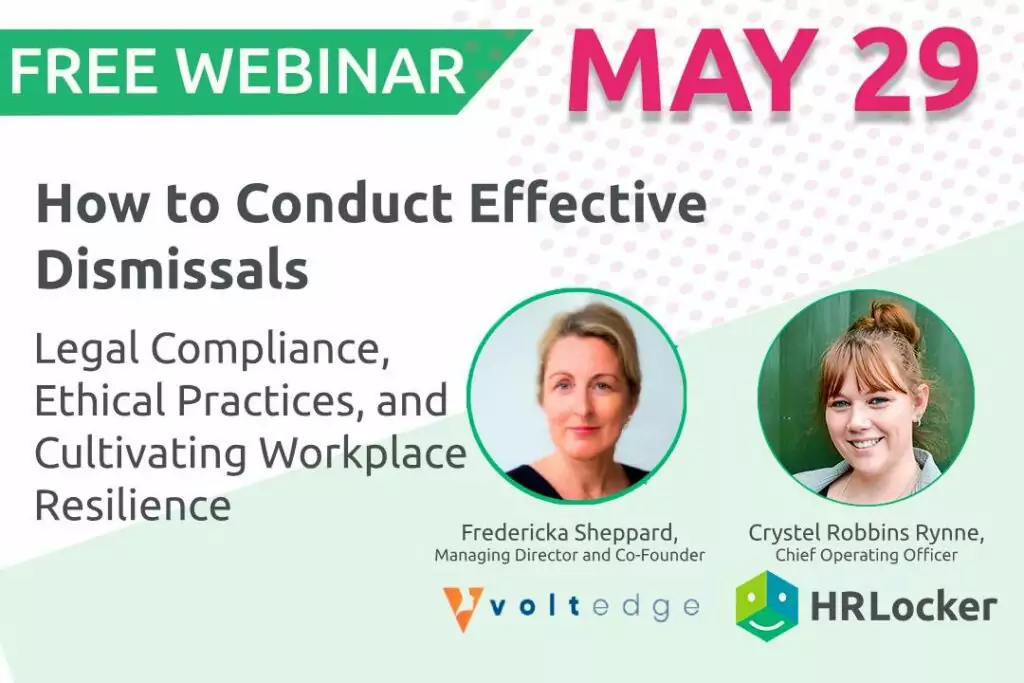
In our free webinar, Fredericka Sheppard, Managing Director and Co-Founder at Voltedge, explores the key aspects of dismissal management, offering insights and best practices to help HR professionals traverse this challenging terrain with confidence and integrity.

How to Conduct Effective Dismissals Free Webinar


What Counts as Unfair Dismissal

According to the Irish Citizens Information Board (CIB), there are certain circumstances under which dismissals are automatically considered unfair. That is, if they are based on an employee’s:

  • Membership, or proposed membership, of a trade union or participation in trade union activities;
  • Religious or political opinions;
  • Being a party or witness to legal proceedings against an employer;
  • Race, colour, sexual orientation, age, membership of the Traveller community;
  • Any matters connected to pregnancy or birth, including breastfeeding, medical appointments, and antenatal classes;
  • Availing of leave under rights provided by law, such as maternity, adoptive parents, paternity, carer’s, parental, or force majeure;
  • Unfair selection for redundancy, or making a protected disclosure, that is to say, raising concerns about wrongdoing at work.

It’s also considered unfair dismissal when an employer ends a contract of employment without providing a good reason, known as 'grounds for dismissal', or without following fair procedures and taking appropriate actions laid out by law.

How to Proceed with Dismissals

Constructive dismissal is another form of unfair dismissal. It differs because, instead of the employer initiating the parting of ways, the employee leaves their job due to the employer making working conditions so difficult that it's unreasonable for them to stay.

The reasons an employee gives must be serious enough to justify their decision to leave. The employee must also have proof that an employer behaved in a way that made resigning their only choice. For example, the employer is:

  • In serious breach of contract, such as not paying or demoting them for no reason;
  • Forcing unreasonable changes onto their conditions of employment without agreement, for instance, changing shift patterns without talking to them about it in advance;
  • Taking away contractual benefits like health insurance or a company car that they rely on;
  • Subjecting them to unfair criticism or singling them out for discipline;
  • Allowing them to be bullied or harassed by colleagues or customers without interjecting;
  • Creating or failing to prevent dangerous working conditions;
  • Making false allegations of fraud or misconduct.

The CIB and WRC advise employees to raise the issue and try to resolve it before taking action when considering resigning under constructive dismissal. As HR professionals, it’s vital that employees are supported through this process, as covered by the regulations and using workplace complaints or grievance procedures.

What Counts as Fair Dismissal

Put simply, a fair dismissal is one that cannot be judged to have been unfair. The Law Society of Ireland says that a dismissal must satisfy three conditions to be considered genuinely justified.

The three conditions of fair dismissal

The onus is always on the employer to prove a dismissal following natural justice and fairness rules. To be considered fair, the dismissal process must be:

  1. Initiated on fair grounds, laid out above, for dismissal under Irish law;
  2. Carried out according to fair procedures and with just actions;
  3. Not contrary to any of the reasons deemed automatically unfair.
    Employee Dismissals

Fair grounds for dismissal

As per the first critical condition, dismissals must be backed up by legitimate reasoning to be considered fair. Known as ‘grounds’, these reasons are clearly laid out by law. In short, the dismissal is deemed not to be unfair if it results from one or more of the following:

Capability: It can be grounds for dismissal if an employee can’t do their job because they are repeatedly late or absent. Capability covers both medical and non-medical lateness or absences. So, everything from repeatedly missing the bus and frequent short-term sick leave to long-term medical conditions.

Competence: If an employee is not meeting expected standards, it can be grounds for dismissal. Competence covers instances when employees fall short of what they were hired to do, for example, turning in poor-quality work, missing targets, or not hitting KPIs. Interestingly, a recent report from Mason Hayes & Curran revealed that 44% of employers find dismissal on the grounds of competence to be the most difficult.

Qualifications: If an employer finds out that an employee has misled them about their qualifications, it is grounds for dismissal. If gaining additional qualifications like industry training or certification is a condition of employment, and the employee fails to achieve this despite being given an opportunity to do so, they can also be dismissed.

Redundancy: Redundancy covers situations where the employee is no longer needed by the business. If, for instance, the organisation is changing or in times of economic downturns, it might be necessary to scale back workforces. Similarly, if the business is closing or being merged with another company, an employee’s role might not be needed.

Contravening the Law: This means that employing the person would be contrary to regulations or legislation. If an employee is prevented from continuing to work under certain restrictions, for example, if their work permit expires, there are fair grounds for dismissal.

Some other substantial grounds (SOSG): This umbrella term covers issues that don’t fall under any other grounds. SOSG typically refers to conduct. Behaviour can range from a series of minor incidents to a case of gross misconduct. Some examples are an employee engaging in bullying, creating conflicts of interest, or having personality clashes. However, SOSG also includes instances when dismissals follow pressure from customers or investors, reputational damage, a breakdown in trust or confidence, and the expiry of fixed-term contracts.

Advice for HR When Dealing with Dismissals

Employment laws and codes of practice are complex areas to deal with. Especially if it’s the first time you or your company is considering dismissing an employee. Ensuring a dismissal is fair is like walking across a balance beam. One tiny sway either way, and it’s a potential case of unfair dismissal and all that it carries with it.

As an HR professional, you’re caught between ensuring the employee’s rights and upholding the company’s interests. To avoid undue harm to the employee and the potential claims and subsequent sanctions and reputational damage that come with unfair dismissals, you must follow correct procedures and have reasonable grounds. If in doubt, it’s always best to consult an expert for legal advice.

The HRLocker HR Dismissal Checklist provides a structured, step-by-step process for HR Managers to follow when dismissing employees. It ensures compliance with legal requirements, company policies, and fair procedures, thereby mitigating risks of unfair dismissal claims. Download now for free.

HR Dismissal Checklist


Dismissals are never easy. But, having the right information, policies and practices will help you through the processes, make certain it’s fair for the employee, and protect your organisation from the consequences of unfair dismissal.

The Difference Between Fair and Unfair Dismissal was last modified: August 15th, 2025 by Agile Communications
(more…)

2 min read

There are 100s, if not 1000s of HR solutions on the market. As much as we’re confident that HRLocker is the perfect, robust, supportive solution for most growing companies, you really ought to just buy the first cloud vendor that meets your needs and fits your budget. Sound radical? But it’s not really.

Otherwise, in all honesty, by shopping around too much, talking to reps and running tonnes of trials, you’re wasting all the time and money you’re trying to save.


When You Buy HR Software

You’re probably going to spend too much time scoping it out and get lots of stuff (functionality and features) that you don’t need or will never use. Often just because of the one thing you’re really prioritising from a solution that’s buried somewhere in a suite of features you don’t either want or need.

It’s probably going to take 9-12 months to scope out, set up and rollout (at least) and you are probably going to pay way over the top and will seriously dent your potential ROI.

By the time you’re eventually nearly reaching ROI, the peculiar features you wanted might be ‘out-of-date’ and a new player will already be on the landscape but likely not offering everything else you wanted.

Back to square one…


Focus on Features and their Benefits to You

You basically need to set up a small matrix listing exactly and only what you need. Itemise your ‘must-have’ features, ‘would like’ functionality and itemise other vital factors such as ISO compliance, data security standards and so on.

And then leave space for notes on what you can glean from various suppliers’ websites and conversations you have with them about backup and support and other ‘extras’ as part of the service.

HRLocker gives first-call HR support. We are always available on the other end of the phone. Don’t take our word for it, read some reviews!

Then score them and rank them. And be strict and pick, or trial, only the solutions offering what you need.


There is no such thing as HR Problems! There are, however, business issues that get in the way of making people more productive at what they do.

Why not look at the business problems that you need to solve? If the time spent managing your workforce is one of the business issues that can be more efficient, then streamline it with HR software. Find all ways possible where you can solve these types of problems through automation, smoother systems, workflows and procedures.

And, if they work, then, and only then, roll them out organisation-wide. This approach is way less financially risky. Trust me, it works.

How Not To Buy HR Software was last modified: March 4th, 2024 by Crystel Rynne

(more…)

2 min read

If you dread staff knocking on the door or seeing emails requesting time off. We understand. We know you’d rather be on that beach sunning yourself too. Hmm, imagine that for a second.

You wouldn’t be alone. We’re amazed on a daily basis how many organisations of all sizes are still using Excel templates to plan their staff holidays and time off.

We can only imagine the amount of time and money resources that are wasted trying to plan who’s off and who’s at work during busy periods.

An organisation’s leave planner system and policy can be one of the most challenging, contentious and frustrating parts of human resources management.

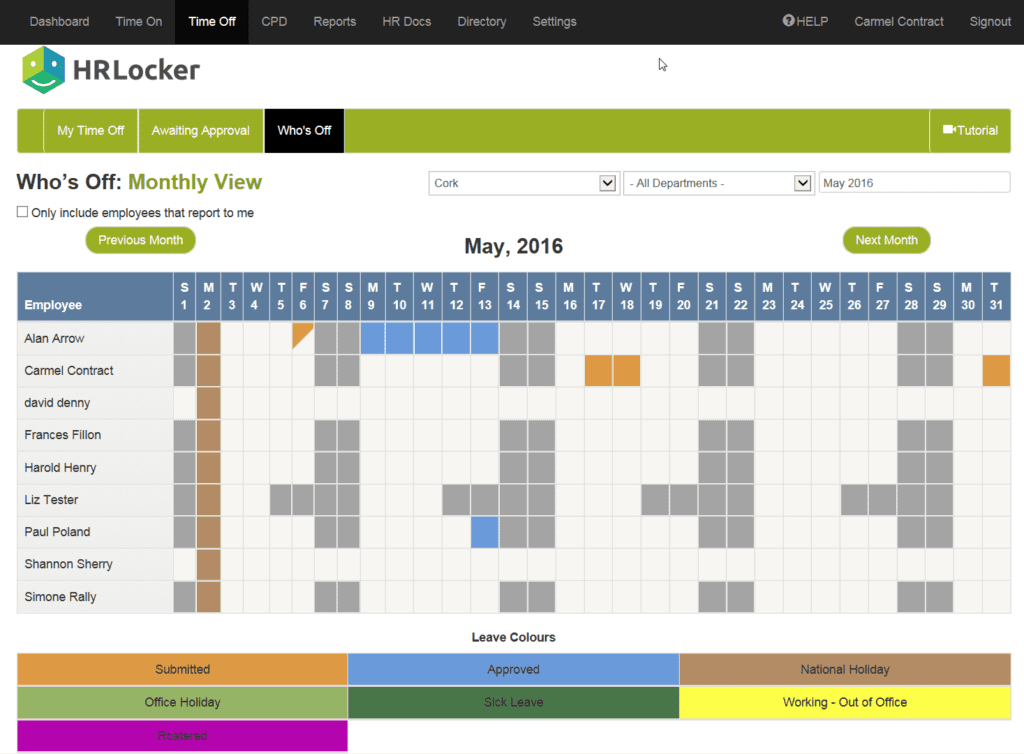
Visual Staff Time Off Calendar

How about an easy-to-view calendar - that also shows in iCal formats such as Google Calendar, Apple/Mac and Outlook) - showing who’s booked time off?

Screenshot of HRLocker's Who's Off calculator

And a policy document you distribute with all the rules about who can or cannot be off – and when – so any understaffing overlaps are avoided before you even see a request?

That would give you a chance to plan cover and book stand-in staff ahead, also saving you more money.

You’d be able to easily plan when to slip away on a road trip yourself.

Keep dreaming. Perhaps you’d like to have a simple message with approve/deny options for requests? And a list with a nice overview of pending and approved requests?

Is that all asking too much?

Imagine how much time it would save you.

Don’t Guess Your ROI – Calculate It

Well, there’s no need to speculate since we built a calculator to help you work out how much time it would save you – let alone your team putting in requests.

cocktail on beach for staff holiday planning blog post

Visualising another cold drink on that beach now?

We can help with everything...except the beach and the cocktail.

Staff Holiday Planning Headaches was last modified: August 8th, 2025 by Agile Communications
(more…)

4 min read

If you’re applying for jobs online, at some point you'll encounter an Applicant Tracking System (ATS). Here, you'll learn how an ATS works, what they do to your resume if you are applying, or how they can help save your business time and resources if recruiting.

Commonly abbreviated as ATS, an applicant tracking system is just as it sounds. While it’s most commonly known to track applicants, these systems also provide recruiting and hiring tools. From collecting resumes to sorting prospective employees, applicant tracking systems serve as a database for job applicants. Ideal for both large and small companies, an ATS helps organise, search, and locate qualified applicants. In essence, this system breathes convenience into recruiting and hiring employees.

When looking into multiple candidates, it’s easy for companies to get bogged down in the details. Moreover, finding appropriate applicants for each position demands great attention to detail. Fortunately, an applicant tracking system relieves hiring managers of the hassle that comes with this process. Thanks to applicant tracking systems, gone are the days of sifting through an abundance of resumes. Instead, this modern alternative provides automated solutions that promote efficiency and accuracy.

How Does An Applicant Tracking System Work?

The primary purpose of an applicant tracking system is to streamline the recruiting process. It does so by putting employers in touch with suitable candidates. For optimal results, recruiters should make detailed job postings. The more specific this posting is, the more fitting your applicants will be. Drawing in the wrong candidates will only prolong this task, so be sure that you’re taking a thorough approach.

When applying for a job through an ATS, you’ll likely be asked knockout questions. With these pointed questions, employers can whittle down the pool of applicants. In other words, they allow recruiters to eliminate unfit candidates early on. Depending on the criteria the employer has set, the applicant tracking system will reject resumes that don't meet certain requirements. On the other hand, if an applicant answers the questions satisfactorily, they’ll move on to the next stage.

Once you have all your potential candidates, you can track them throughout the process. For instance, an ATS will let you know if an applicant has graduated to their second or third interview. Similarly, if a candidate has proven unwilling to commit to their job requirements, an applicant tracking system will remove them from the pool. You can also keep applicants for future reference, making it easy to reach out to candidates when a new position opens up.


Applicant Tracking System Benefits

Applicant Tracking Systems are multifaceted and have many features, many of which may vary based on which brand of software you’ve invested in.

Thanks to their dynamic, user-friendly features, applicant tracking systems offer several benefits. However, not all applicant tracking systems are created equal, so you’ll want to look into each brand before moving forward with a selection. In most cases, here’s how an ATS can prove advantageous to your company.

Viewing Applications

Viewing applications is a breeze with applicant tracking systems. Recruiters can quickly glance at resumes, immediately determining whether or not someone is a good fit. For candidates, this means that highlighting your top skills is critical. Otherwise, your resume is liable to get lost in the shuffle.

Automatic Rankings

More advanced applicant tracking systems have automatic rankings. After comparing your job description to a resume, an ATS can decide how qualified an applicant is. Since an ATS does all the legwork, recruiters don’t have to worry about weeding out ill-suited employees.

Keyword Searches

Keyword searches help recruiters find certain resumes. For example, maybe you’re looking for an applicant who has a background in the food industry. Using keyword search tools, you can find what would otherwise be a needle in a haystack. From skills and experience to location and education, you can make your search as specific as you want.

The list below highlights some additional benefits that an ATS offers.

  • Applicant communication
  • Sourcing
  • Automated email customisations
  • Resume storage
  • Job posting distribution

Enhance Your Company’s Operations

With an ATS, you save time, money, and effort. What’s more, you gain access to talent pipelines that are rich with certified candidates. By investing in an applicant tracking system, you can fill positions faster while building your dream team. To see which applicant tracking system is right for you, place your trust in HRLocker. Between our world-class customer service and extensive expertise, we make your experience hassle-free from start to finish.

HRLocker is a people management solution with a built-in recruitment module to help you hire key talent for your organisation.

What is an Applicant Tracking System? was last modified: September 27th, 2023 by Jenny Martin

(more…)